My Work
My Work —
never miss a task, every day
My Work brings every task, approval, reminder and collaboration from all modules into one personal work inbox. Always proactive, always on time — whether at the office or on site.

Your dayFriday
Total tasks
12
Today's tasks
5
Overdue
3
Needs action now
Completed
8
Approve material requisition
Riverside project
Key benefits of My Work
Work inbox
Bring every task from projects, approvals and the system into one place.
Priorities & deadlines
Automatically sets priorities, sends reminders and flags due dates.
Personal approvals
Handle every approval request on web and mobile.
Reminders & notifications
Never miss a task with multi-channel notifications: web, email, mobile.
Site tracking
Receive tasks and update progress directly from site.
Cross-department links
Link work to projects, cost, procurement, warehouse, HR and finance.
Personal workflow
1. Receive tasksFrom projects, the system or direct assignment
2. HandleCarry out tasks and update progress
3. CollaborateDiscuss, attach documents, @colleagues
4. ApproveSubmit for approval or await approval
5. CompleteClose tasks and archive automatically
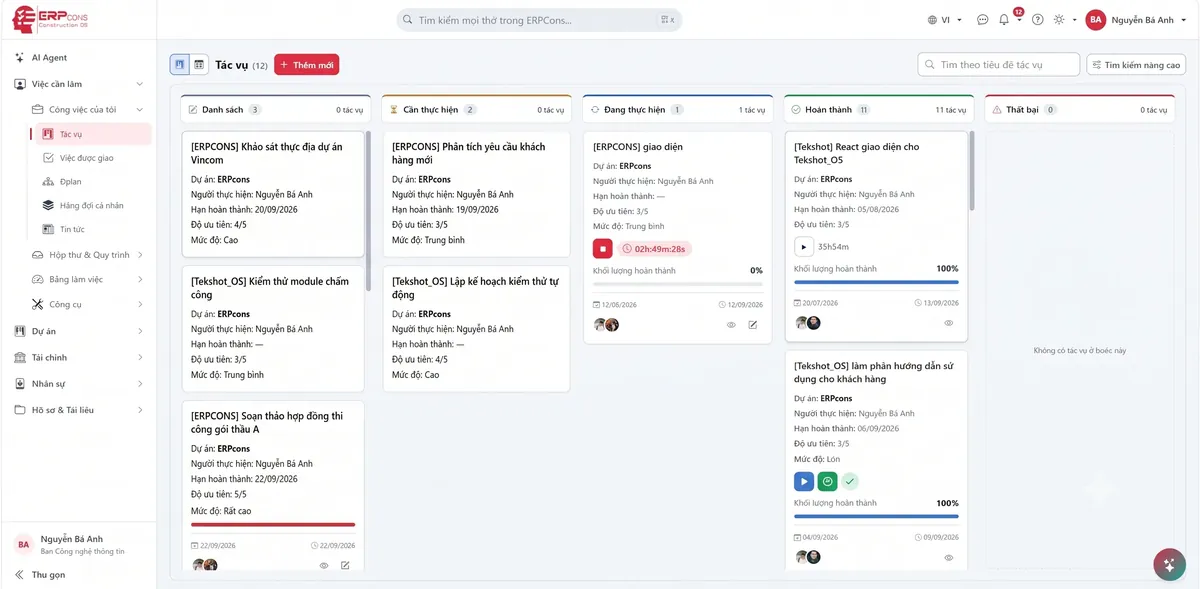
The My Work interface in reality
Who uses it
Site managerReceive and carry out site tasks
PMOversee the whole project
QSControl quantities and records
AccountantProcess requests and payments
ProcurementTrack purchase requisitions
PeopleManage HR tasks
Frequently asked questions
From every module in use: Projects, Cost, Procurement, Warehouse, HR, Finance… When a process needs your action or approval, the task appears in My Work automatically, with a link back to the source document.
Yes. My Work runs on the web and a mobile app; you receive notifications, update progress, attach site photos and approve right from your phone.
Every task has a due date. The system reminds you before it is due, alerts you when it is overdue and sends notifications via web, email and mobile according to each person's settings.
Yes. Besides system-generated tasks, you can create your own, assign them to colleagues and link them to projects so every discussion is on record.
Ready to take control of your work every day?
Try ERPCons and build effective work habits, never missing a task.